

The EnhancedIRL Encoder
The EnhancedIRL Encoder turns an NVIDIA Jetson Nano into a hardware encoder with a live mixer for IRL streaming. It’s free and open source: the code, the releases and the microSD image are on GitHub.
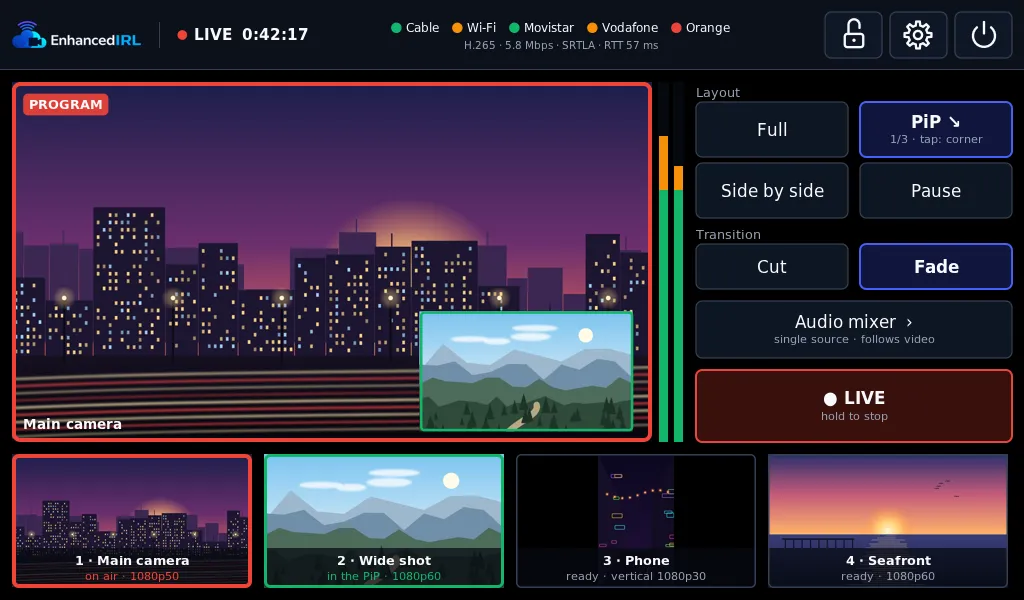
What it does
Section titled “What it does”- Inputs: a camera’s HDMI, USB capture cards and USB cameras, and phones or cameras over the network (RTMP or SRT), joined to the encoder’s own Wi-Fi or by cable.
- Mixer on the touch screen: cut and fade, picture-in-picture, side by side and a pause slate with text. Up to four sources at once.
- Audio separate from video: one input or a mix, with gain per input and headphones on the screen’s jack.
- Streams in H.264 or H.265 over SRT, SRTLA, RTMP, RTMPS, RIST or UDP, with several saved destinations and one in use.
- Bonding: with SRTLA it spreads the stream across cable, Wi-Fi, USB 4G/5G modems and an iPhone plugged in by cable.
- Web page on your network: run it from your phone or laptop too, with a preview.
- Updates over the internet: it tells you about each new version and you install it with a button, never while you’re live. If it doesn’t start, it goes back to the previous one by itself.
The screen and the web page come in English, Spanish and French.
Who it’s for
Section titled “Who it’s for”Anyone who builds their own backpack and wants a dedicated device instead of the phone. You need a Jetson Nano 4 GB with the B01 carrier and a few more parts: the list is in What you need.
What EnhancedIRL adds
Section titled “What EnhancedIRL adds”The encoder streams anywhere on its own: Twitch, YouTube, Kick or your own server. There are two things it can’t do by itself:
- A receiver for bonding. SRTLA spreads the stream across your connections, and something has to put it back together on the other end. A stream key is that receiver, in Europe, the US or Asia, from €5 a month. How to set it up: Broadcasting with the EnhancedIRL Encoder.
- A real OBS in the cloud. Cloud OBS takes the encoder’s stream and runs your scenes and overlays on an NVIDIA GPU, with automatic scene switching: if your signal drops, your audience sees your BRB scene instead of a frozen picture.
Linking the encoder to your account, to see it and control it from the dashboard, is in closed beta.
Where to start
Section titled “Where to start”- What you need: the board, the capture, the screen and the power supply.
- Writing the image and booting.
- The first-boot wizard.
- Broadcasting with the EnhancedIRL Encoder to your stream key.
And for day-to-day use: the sources, the mixer, the connections, updates and what to do if something fails.
Questions, or want to show your build? The community is on our Discord, in English. Encoder bugs go to the GitHub issues.