

The remote desktop
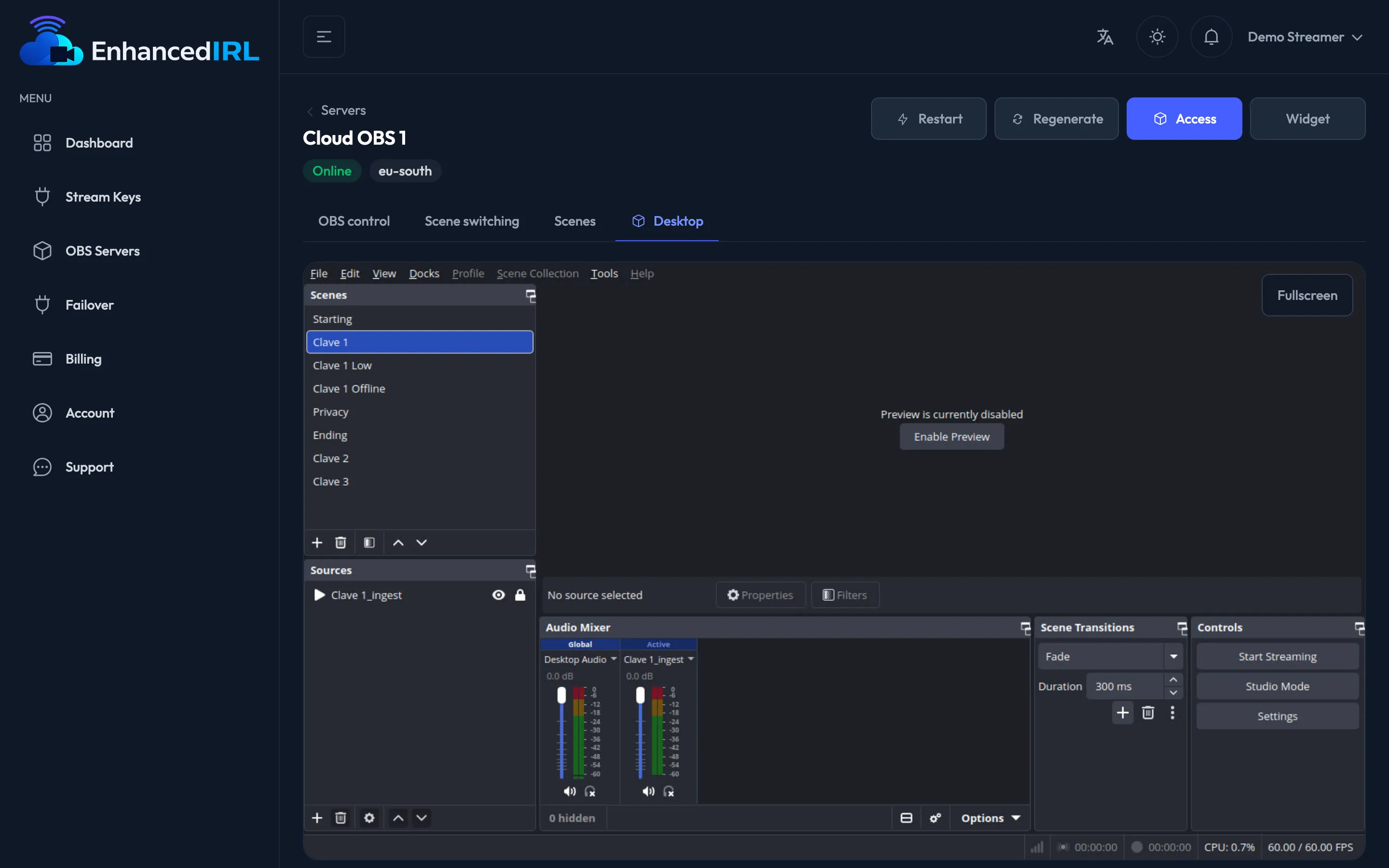
The remote desktop gives you the real OBS, with its menus and its canvas, inside your browser.
OBS Standard and OBS Pro only
Section titled “OBS Standard and OBS Pro only”On OBS Basic it doesn’t exist. There’s no Desktop tab, there’s no Access button: you drive the server from the web control panel and with the overlays.
If the tab isn’t showing in your dashboard, that’s why. To get it you have to move up to Standard or Pro (Change plan).
Where it is
Section titled “Where it is”Side menu → OBS Servers → click on your server → Desktop tab. You also get there with the Access button, both from the detail and from the server list.
The server has to be Online. If it’s Stopped, hit Turn on and wait a few minutes.
What it’s for
Section titled “What it’s for”For everything the web panel doesn’t do, because you’re using OBS directly:
- Adding and ordering sources: cameras, text, images, browser.
- Placing and scaling elements on the canvas.
- Filters, chroma, transitions.
- Using the files you’ve uploaded (Assets).
Right below the desktop you have the Assets panel to upload images, video or audio without leaving here.
Copy and paste
Section titled “Copy and paste”From your computer to OBS. Copy the text on your computer, click in OBS where it goes and press Ctrl+V (on a Mac, Cmd+V works too). The first time, your browser asks for permission to see what you’ve copied: in Chrome and Edge a prompt shows up next to the address bar; allow it and it won’t come back. In Firefox a Paste button shows up next to your pointer every time you paste: click it.
From OBS to your computer. Whatever you copy in OBS (Ctrl+C or the right-click menu) lands on your computer’s clipboard. It works in Chrome, Edge and Firefox.
If your browser won’t let you paste, or you’re on your phone, use the Paste text button at the top of the desktop:
- Hit Paste text, type or paste the text in the box and hit Send.
- In OBS, paste it with Ctrl+V or from the right-click menu. On your phone, a right-click is a two-finger tap.
If the picture is choppy
Section titled “If the picture is choppy”What you see on the desktop is a preview: it arrives less smooth, a little delayed and at lower quality than your stream. That’s normal and doesn’t mean OBS is struggling. Your stream leaves the server at your plan’s quality, and what your viewers see doesn’t go through this view.
The dashboard reminds you with a notice above the desktop, in fullscreen too. You can close it with the ✕; it comes back the next time you load the page.
To see how your stream really looks, watch it on your platform (Going out to your platform).
On your phone
Section titled “On your phone”You can, but the OBS desktop isn’t built for a five-inch screen. The dashboard warns you: “Rotate your device or go fullscreen for a better view of the desktop.”
- Turn your phone to landscape.
- Hit Fullscreen. To go back, hit Exit fullscreen.
- Tap to click and drag to move.
On iPhone, the browser keeps its own bars on screen and the desktop fills the rest.
To build scenes from scratch, do it from a computer and leave your phone for touch-ups and for the web control panel, which is built for small screens.
The session drops sometimes
Section titled “The session drops sometimes”When we update the platform, open desktop sessions are cut. You’ll see Connection lost and the dashboard reconnects on its own. If it doesn’t, hit Reconnect.
You lose nothing: OBS keeps running on the other side, and if you were live the stream carries on.
Messages you may see
Section titled “Messages you may see”| Message | What it means | What you do |
|---|---|---|
| “Your plan does not include remote desktop access.” | You’re on OBS Basic | Move up to Standard or Pro, or use the web panel |
| “The server is not online. Start it and try again.” | The server is off | Hit Turn on and wait a few minutes |
| “The remote desktop is not ready yet. Try again in a moment.” | It’s finishing starting up | Wait and go back in |
| “The remote desktop is unavailable. Try again in a moment.” | One-off connection failure | Reconnect; if it insists, I can’t see the desktop |
| “Your browser didn’t let us read your clipboard. Use “Paste text” at the top of the desktop.” | When you pressed Ctrl+V, the browser didn’t allow us to see what you copied | Allow it again or use Paste text |
Next step
Section titled “Next step”- Uploading your images, video and audio — so you have material to place.
- Scenes and overlays — what’s already built before you touch anything.